← All projects

SecureBank: Dynamic Monthly Newsletter
One newsletter template that shows each customer three articles about the product they care about. Each month the team updates a Data Extension instead of rebuilding the email.
01 · The result


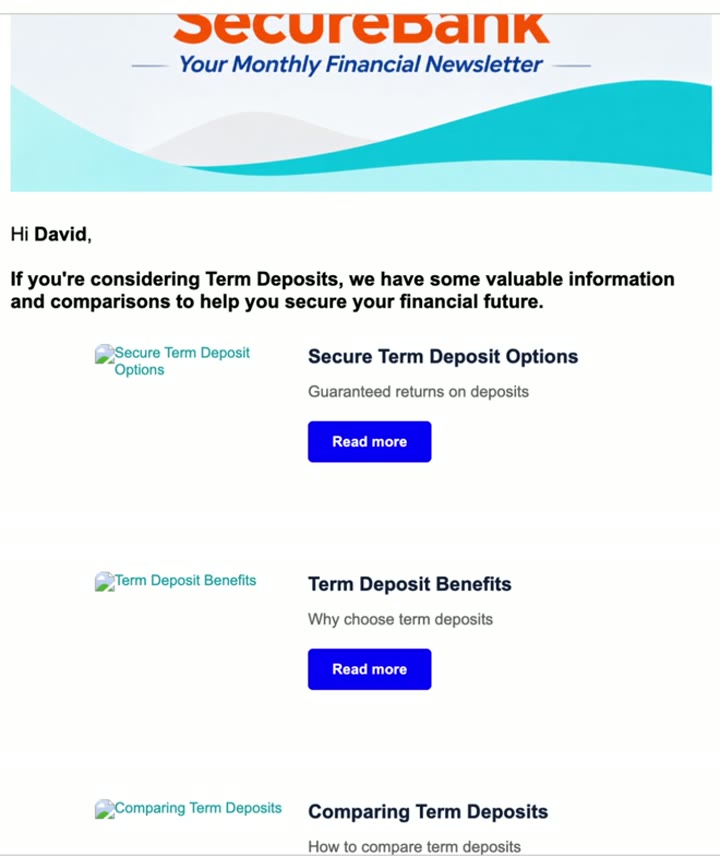
What subscribers actually receive
Swipe to compare →John · Home Loans
Subject: John, check out the latest news in the November Monthly Newsletter!
Sarah · Credit Cards
Subject: Sarah, check out the latest news in the November Monthly Newsletter!
David · Term Deposits
Subject: David, check out the latest news in the November Monthly Newsletter!
Five interest categories, one template. The intro, articles and links all change with the customer's PreferenceCategory, and the month in the subject line updates itself.
02 · How I built it
The logic, in plain English
- Matched each customer's PreferenceCategory to a content Data Extension with
LookupRows, then pulled three article titles, descriptions, images and links. - The subject line includes the current month automatically with
FormatDate(Now(), "MMMM"). - Each of the five categories gets its own intro message through
IF / ELSEIF. RaiseErrorcancels the send for anyone without matching content.
03 · Under the hood
The month and the content come from data
A short excerpt. The full code and the brief's requirements are on GitHub.
AMPscriptDynamic-Email-Newsletter.html
/* RETRIEVE CURRENT MONTH */
SET @currentMonth = FormatDate(Now(), "MMMM")

/* PERSONALIZED SUBJECT LINE WITH FALLBACK */
IF NOT EMPTY(@firstName) THEN
   SET @finalName = Propercase(Trim(@firstName))
   SET @subjectLine = Concat(@finalName, ", check out the latest news in the ", @currentMonth, " Monthly Newsletter!")
ELSE
   SET @subjectLine = Concat("Check out the latest news in the ", @currentMonth, " Monthly Newsletter!")
ENDIF

/* RETRIEVE THIS MONTH'S CONTENT FOR THEIR CATEGORY */
SET @rows = LookupRows("Newsletter_Content_Data", "Category", @prefCategory)
IF RowCount(@rows) > 0 THEN
  SET @row = Row(@rows, 1)
  SET @Article1Title = Field(@row, "Article1Title")
  SET @Article1Link = Field(@row, "Article1Link")
  /* ... articles 2 and 3 ... */
ELSE
  RaiseError("No row was found")
ENDIF